What is the Healthcall in-room TV?
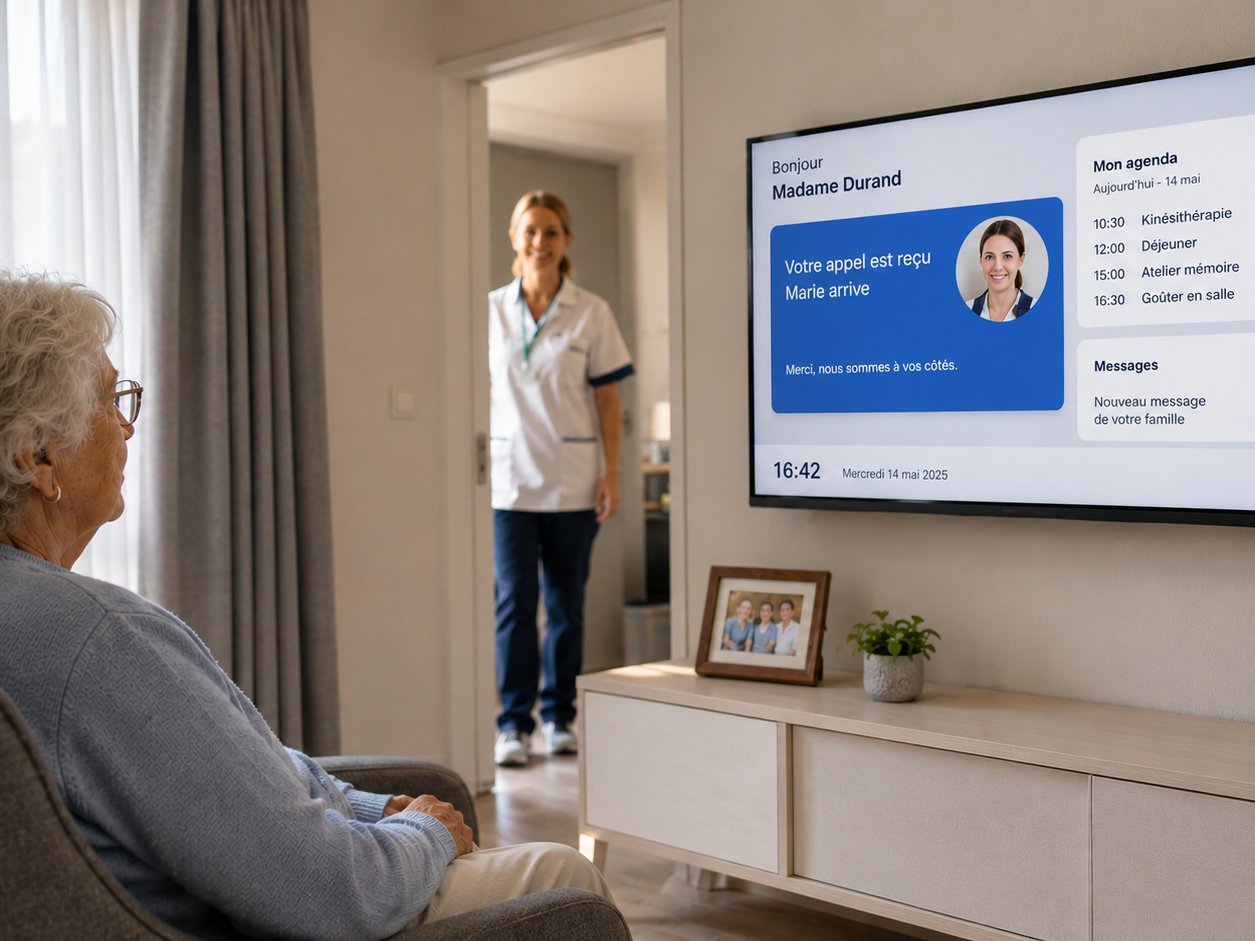
The Healthcall in-room TV is a professional hospitality television driven by the Healthcall ecosystem and integrated with nurse call, family communication and room automation. When the resident presses the red button on their remote, the TV immediately displays who is coming, with photo and voice. When an activity awaits them, the screen reminds them. When a relative sends a video message, it appears directly on the screen. The TV ceases to be a passive device: it becomes the main interface of the room.
Unlike hospitality televisions deployed in hotels and transposed into nursing homes without integration to the care system, the Healthcall in-room TV is designed for the reality of a Belgian residential care facility: elderly residents with variable autonomy, reduced care teams, regulatory constraints (Woonzorgdecreet, AViQ, GDPR), long-term residence, limited night-time staffing. The module integrates with the existing Healthcall ecosystem (nurse call, central supervision, professional automation, resident phone) without third-party server or additional platform.
-
< 3 sec
Carer notification
TV display delay after button press
-
0 minutes
Reconfiguration
no re-entry during a room change
-
100% BE
Hosting and support
Belgian private cluster, triple database
-
1 contract
All-in-one
TV, remote, nurse call integration and maintenance
See → Act → Reassure
Three times structure the resident experience on the in-room TV. The resident sees, acts, is reassured. The system follows, never the opposite.
- See
The resident sees what is happening for them
The nurse call they just triggered is displayed. The arriving carer is named and shown. The day's agenda appears. Family messages can be consulted. The morning welcome page greets them by first name.
- Act
Four coloured buttons, no learning required
With a senior-adapted remote, the resident controls light, blind, heating, night light. Calls a carer. Registers for an activity. Views family photos. No app to download.
- Reassure
Calming visual and vocal feedback
Every action triggers a confirmation. The call is confirmed, the carer named. The voice is gentle, never alarming. At night, the screen turns off, the night light comes on. The system calms down with the resident.
Five principles, aligned with the Healthcall ecosystem
The in-room TV follows the same five principles as the rest of the ecosystem, applied to the resident's daily life in their room.
-
Dignity
Respect for the rhythm and autonomy of the elderly resident. The TV fades when not wanted, lights up when needed, never imposes its presence.
-
Autonomy
Everything the resident can do alone, they do alone: turn on the light, close the blind, call for help, choose a channel, read a message from their daughter.
-
Connection
Family and carers remain present even when not in the room. Photos, video messages, first name of the arriving carer, calendar of upcoming visits.
-
Safety
Fire alerts and nurse calls visible on the screen without depending on other devices. The resident receives critical information where they are already looking.
-
Simplicity
Zero technical learning for the resident. Zero reconfiguration for staff at room change. A four-coloured-button remote, that's it.
Five core functions
The module rests on five differentiating functions that structure the resident experience and operational value for the director.
-
1. Nurse call made visible and reassuring on the TV
The resident presses the red button. The TV instantly switches to a confirmation screen: "Marie is on her way" with photo of the carer. A gentle voice confirms verbally, essential for visually impaired residents or those in early dementia. Status synchronized with corridor signal. Resident status respected ("do not disturb", "night", "absent").
-
2. One supplier, one contract, hardware included
Professional hospitality TV supplied and installed. Senior-adapted remote supplied. Centralized configuration from Healthcall admin. Native integration with the existing nurse call deployment. One support contact, one invoice, one maintenance contract.
-
3. Resident onboarding day 1
On first TV power-on after admission: personalized welcome page "Welcome Mrs Janssen", short tour video of the home, visual presentation of the reference team with photos and first names, floor map, short remote tutorial. "First day" home page active for seven days then automatic switch.
-
4. Essential controls from the chair
Light (Shelly integration), blind, heating, programmable night light per resident profile, automatic night mode. All from the four coloured buttons of the remote. Compatible with the Healthcall professional automation module for centralized multi-room control.
-
5. Integrated family link, no app for the resident to install
The family sends photos, video messages, voice messages via a secure web portal with personal link per resident. Content automatically appears on the relative's room TV. Voice messages paired with automatic transcription in French, Dutch or English for hard-of-hearing residents. Calendar of upcoming visits shown on the welcome page.
Visual coming soon
Nursing home room with TV showing personalized welcome screen, senior-adapted remote on the bedside table
Technical architecture
The in-room TV module rests on the same technical foundation as the rest of the Healthcall ecosystem: native integration without third-party server, Belgium-exclusive hosting, centralized OTA updates.
- Professional hospitality TVs: Healthcall natively drives LG hospitality screens. The facility receives a coherent, certified and installed park.
- Senior-adapted remote: four coloured buttons programmable per resident profile, typically nurse call, light, blind or heating, and welcome or menu.
- Network: VLAN dedicated to resident equipment, isolated from visitor Wi-Fi and care network.
- Nurse call integration: the TV receives notifications directly from the Healthcall ecosystem, not from a third-party server. Median display latency under three seconds.
- Hosting: private cluster at premium Belgian host, triple database in mirroring. No subprocessing outside the European Union for resident data.
- Updates: OTA centralized from Healthcall admin, no on-site intervention.
Four concrete scenarios
Tuesday 14:12, nurse call during a documentary
Mrs Dupont, room 24, is watching a wildlife documentary. She needs help going to the bathroom. She presses the red button on her remote. The documentary volume automatically lowers and a confirmation screen overlays: "Your call has been received, Marie is on her way" with the photo of Marie, the floor's care assistant. A gentle voice confirms verbally.
In the corridor, the signal in front of room 24 turns red and then green when Marie accepts the call on her smartphone. Thirty-five seconds later, Marie is in the room. BLE detection automatically registers her arrival. Volume returns to its initial level. Total resident stress duration: less than three seconds between press and visible confirmation.
Monday 10:47, Mr Lambert's admission
Mr Lambert has just moved into room 18. His family accompanied him. At 11:00, first TV start-up. On screen: "Welcome Mr Lambert to our home". Photo of his room, plan of his floor, visual presentation of the reference team: Marie for morning, Sophie for afternoon, Pierre for night. A short welcome video introduces the home, common spaces, meal and activity times. The remote tutorial, forty-five seconds, shows the four buttons. The "first day" home page remains active for the first seven days.
Sunday 16:00, Mrs Robert's daughter sends a video message
Camille, Mrs Robert's daughter (room 9), records a two-minute video message from her sofa: news of the grandchildren, weekend photos. She uploads the message to the family portal via her secure personal link.
At 16:30, Mrs Robert turns on her TV for the first time in the afternoon. The home page indicates: "Camille has sent you a message". One press, the video plays. If Mrs Robert has ticked the transcription option, the text scrolls as subtitles. Camille had no app to install: web portal, personal link, that's it.
Tuesday 14:00, Mrs Janssen changes room, her TV follows
Tuesday morning. Following a change in her health condition, Mrs Janssen has to move from room 14 (standard floor) to room 32 (reinforced care floor, closer to the night staff). The room change is performed in Healthcall admin.
At 14:00, Mrs Janssen enters her new room. The TV is already on and shows: "Welcome to your new room, Mrs Janssen". Her usual channel list is there. Her day and night volume cap is respected. The photos sent by her family last week are accessible. Her activity agenda is up to date. Display language is hers. No re-entry was required. No loss of personalization. Data belongs to the resident, not to the room.
The in-room TV is a building block: not the boundary
Like all Healthcall modules, the in-room TV fits into a unified ecosystem. The following modules complement it or make it more powerful.
-
Nurse call
The foundation that makes the in-room TV intelligent. Without Healthcall nurse call, no resident-carer notification on the TV.
-
Resident phone
Simplified senior telephony complementing the room experience on the audio side.
-
Professional automation
Centralized multi-room control for the essential commands triggered from the TV.
-
Central supervision
Single-pane view of screen status alongside calls.
To discover all modules: view the full ecosystem.